
Requirements:
- Review the details on the state website: https://www.ilsos.gov/departments/index/notary/online-notary.html
- You must already be a traditional notary first.
- Take an educational course and pass a test with a state approved Study Course Provider.
- SIGNiX is not a "Study Course Provider" at this time, as we only train notaries how to use our software, not how to be notaries in their state.
- You can find state approved "Education Providers" here on their website: https://apps.ilsos.gov/notary/scourseproviderlist
- Sign up with a RON vendor, like SIGNiX
- Purchase a Digital Notary Seal image from a third party vendor that meets the state's requirements:
- Serrated or milled edge border, rectangular in shape
- the notary’s name (as shown on the notary’s commission)
- the words "Commission No." followed by the number
- the words “Official Seal”
- the words “Notary Public, State of Illinois”
- the words "My Commission Expires" followed by the expiration date
- We recommend the company eNotary Supplies, and enter code "signix" at checkout to save $5 off the purchase of your digital seal image.
- Login to the state's website to begin the application process: https://www.businessexpress.ny.gov/
- Click on "Search Applications" and search for "Notary"
- Sign in or create an account on the state website
- Click on the option to Apply for an Electronic Notary Public commission
- Follow the on screen steps to find your record and proceed
What is required to enter during the application?
You must provide the state with the completion certificate showing that you completed your Study Course with the approved provider. This can be a PDF type file saved to your computer that you can upload to the state website.
A PDF copy of the completed bond form, either the I 263 form or the I 264 (Notary Public Bond) depending on your situation, signed and certified by a qualified suety bond company - SIGNiX is not a bond company and cannot assist with this.
You will be adding an "Electronic Notary" to your commission, so you will need a document that contains your electronic signature.
To do this, you will need to sign and stamp an Exemplar document in your SIGNiX account and then upload that completed document into the state's website as part of the application process online.
Click here to download a copy of the Exemplar.
Complete the transaction and download the signed document to your computer - consider renaming it so you can tell it apart from the unsigned original to avoid confusion.
Need help with creating and completing a SIGNiX transaction?
Please contact your Success Manager to discuss getting signed up for training, as this will be covered in onboarding and general training videos for all notaries.
Once you have all items ready to provide - Certificate, Bond form, and signed Exemplar - then you can start the application process on the state website here: https://apps.ilsos.gov/notary/
There is a button to click which says "Add Electronic Notary" and in addition to the other required information on the screen, it will also ask you for your Commission Number.
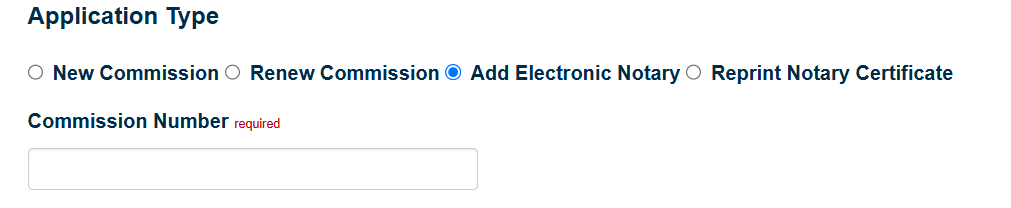
Once you have filled in all info, click the on the Attestation, and then the Submit button.
What happens after the application is submitted?
The state of Illinois will contact you about your approval. If there was any issue found within the application, they will email you to correct it and resubmit as needed.
You might be prompted to provide a picture of the Exemplar document showing your electronic signature. This can be done by taking a screenshot of the document once opened.
The state should explain any issues and how to correct them, but you are welcome to send questions you have to our Customer Support team as well: customersupport@signix.com