
How does Two Factor Authentication work?
The signer will have to first click a button to Accept Legal Consent on the first login screen, and that action will trigger a text message to be sent to the phone number that was entered by the submitter while creating the transaction before sending it off for signature. The phone number will be listed on the screen for the signer to see.
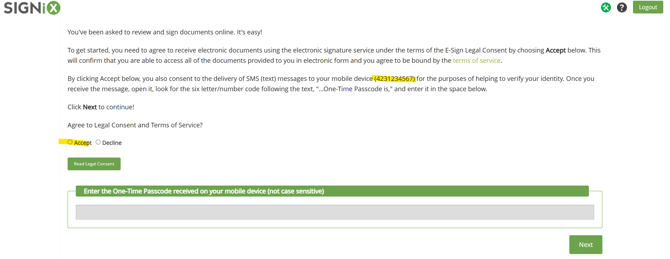
The signer must have a mobile phone plan which allows for the acceptance of SMS text messages. The signer will then have to enter the secret code from the text message into the box on the login screen - they should not close this screen while waiting for the text to arrive. If they are on their phone to both sign and receive the code, they will need to know how to move between screens / apps on the phone.
The code may be called an SMS or "One Time Passcode" / OTP.
The secret code is time sensitive, so they must enter it quickly. If the code does not work because too much time has passed, the signer will be able to click on a Resend button on the login screen to send themselves a new text message. Only the most recently received secret code will be acceptable for login, any previous codes will no longer work.
There is now a Voice option for when a client is unable to receive the text with the code, they can instead receive a phone call to hear the code and enter it for login.
The "Call Me" button appears after the first text message has been sent.

If the signer notices their phone number on the login screen is wrong, they must contact their Submitter / the person who created the documents and that person will need to update the phone number and resend the email.
The Submitter can contact their company Admin or SIGNiX Support for help with updating phone numbers as needed.
If the signer enters the wrong code several times in a row, the system may Suspend the transaction as a security measure against potential fraud.
The submitter of the transaction should be able to Resume it from within their company account. Some clients may need to contact their company Support team for assistance, if the account does not allow submitters to directly Resume.
Does 2FA work with International Phone Numbers?
We do offer an International SMS option for some clients, however this option does come with a fee that you can discuss first with your Sales Rep. We recommend only turning on this feature if you believe your company will have many non-US signers.
When using International SMS, here is how you must format the phone numbers:
- All international numbers must start with a '+' (plus) sign and area code.
- A space may or may not be used after the area code. After that, NO spaces allowed.
- Examples
CORRECT:+54 9113011…
CORRECT:+549113011…
WRONG:+54 9 11 3011…
WRONG:+54 9 114937…
How should I enter the phone number for 2FA?
Select the "2 Factor Authentication (Text Message) option in the drop down.
Enter the signer's Mobile Number in the field below.
The number must be entered in numerical format with no spaces or dashes.
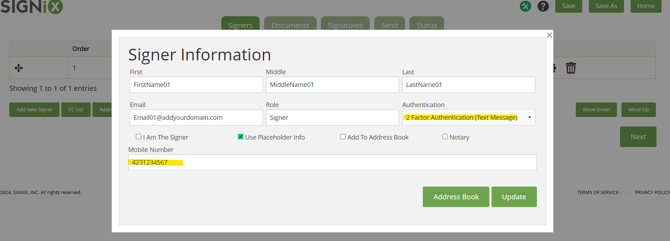
Transactions can be Suspended so that phone numbers can be edited, if entered incorrectly. After the edit has been made, the transaction can be Resumed and then the signer can try again to receive the code and login to sign the documents.
What other Codes might be used for signing?
Some clients may choose to enter their own codes for signer authentication, instead of using the SMS or OTP method offered by SIGNiX for texts.
For example, clients signing documents sent from Osaic may be asked to enter a Verify Code or Verification Code, during login or during password reset. This Verify Code is different from the SMS or OTP because it will not be sent in a text message. Instead, the Verify Code is the answer to a security question to authenticate the signer.
The Financial Advisor with Osaic chose the Verify Code for their client, and can provide the code directly to their signer when necessary.
If the financial advisor has forgotten the Verify Code, then Osaic Support can assist with this issue directly.